

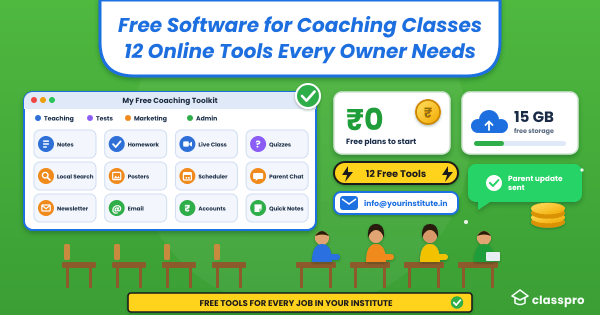

It’s 9 pm, and you’re still matching fee receipts against a notebook. Meanwhile, three parents have messaged you about tomorrow’s test timing. You know software could help, but rent and faculty salaries already take most of your budget. So you search for free software for coaching classes and hope something useful turns up.
Here’s the good news: You can run a big part of your institute on free online tools. This guide lists 12 of them, sorted by the job each one does. You’ll also see each free plan’s real limits, so nothing surprises you later. Then we’ll cover the signs that tell you free tools aren’t enough anymore.
Executive Summary
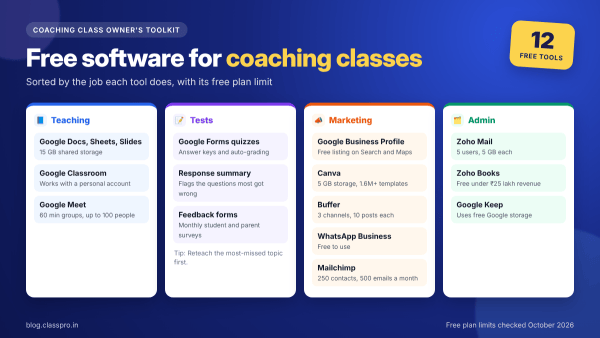
The best free software for coaching classes covers five jobs: Teaching, tests, marketing, parent chats and accounts. Google’s free online tools handle teaching and tests with 15 GB of shared storage. Next, Canva, Buffer, WhatsApp Business and Google Business Profile cover marketing at no cost. Zoho Mail and Zoho Books then handle branded email and GST-ready accounts. However, these tools don’t share data, so most institutes outgrow them once they run several batches.
Free software for coaching classes at a glance
Use this table to match each job with the right free coaching software. Every limit comes from the tool’s own pricing or help page. So you can pick a starting stack in two minutes.
| Job | Free tool | Free plan limit |
|---|---|---|
| Notes and timetables | Google Docs, Sheets and Slides | 15 GB shared storage |
| Homework | Google Classroom | Works with a personal Google account |
| Live classes | Google Meet | 60 minutes for groups, up to 100 people |
| Tests | Google Forms quizzes | Answer keys and auto-grading |
| Local search | Google Business Profile | Free listing on Search and Maps |
| Posters and posts | Canva | 5 GB storage, 1.6 million+ templates |
| Social scheduling | Buffer | 3 channels, 10 queued posts each |
| Parent chats | WhatsApp Business app | Free to use |
| Newsletters | Mailchimp | 250 contacts, 500 emails a month |
| Branded email | Zoho Mail | 5 users, 5 GB each, 1 domain |
| Accounts and GST | Zoho Books | Free under ₹25 lakh yearly revenue |
| Quick notes | Google Keep | Uses your free Google storage |
Free online tools for teaching and study material
Google gives every account 15 GB of free storage across Gmail, Drive and Photos. That’s enough room for most notes, worksheets and slide decks. So start here before you pay for anything else.
1. Google Docs, Sheets and Slides
Docs, Sheets and Slides still sit at the centre of most small institutes. You write notes in Docs, track batches in Sheets and teach with Slides. Also, your faculty can edit the same file at once from a phone or laptop. Next, create one folder per batch so students always find the latest version.
- Sheets: Works as a simple fee and attendance tracker for one or two batches
- Docs: Holds chapter notes, question banks and parent circulars
- Slides: Covers classroom teaching and your demo-class deck
2. Google Classroom
Classroom gives each batch its own space for notes, homework and announcements. Tutors can sign in with a personal Google account, so you don’t need a school domain. Students join with a class code and see every assignment in one stream. Then you return marked work with comments inside the same app.
- Homework: Set due dates, and Classroom tracks who submitted
- Announcements: Post holiday notices and test dates for the whole batch
- Materials: Attach Docs, PDFs and YouTube videos to each topic
3. Google Meet for online classes
Google Meet is the simplest free online coaching platform for live classes. A free account lets you host up to 100 people. However, group calls with three or more people end after 60 minutes. So plan 55-minute sessions, or split long lectures into two parts.
- Doubt sessions: Run short evening calls for students who missed a class
- Revision classes: Share your Slides screen and record notes in Docs
- Parent meetings: One-to-one calls can run for up to 24 hours
Free tools for tests and feedback
Weekly tests keep students on track, but checking papers eats your evenings. A free quiz tool can grade objective questions for you. Then you can spend that time with the students who need help.
4. Google Forms quizzes
Google Forms turns any question set into a self-grading quiz. You set an answer key and points for each question. Forms then shows frequently missed questions, average scores and the score range. For example, a Class 10 maths teacher can spot a weak topic within minutes.
| Forms feature | How it helps you |
|---|---|
| 1Answer keys | Grades multiple choice, checkbox, dropdown and short answers |
| 2Answer feedback | Adds a written note or YouTube link to each answer |
| 3Response summary | Flags the questions most students got wrong |
| 4Feedback forms | Collects monthly student and parent feedback for free |
Once marks pile up across batches, you’ll want report cards too. Classpro’s test results module builds scorecards that parents can download. It also alerts parents once you enter the marks.
Free online tools for marketing and enquiries
Parents now start their search online. India had 958 million active internet users in 2025, says an IAMAI report. Also, 57% of those users live in rural India, so smaller towns search too. These free online tools help you show up when parents look.
5. Google Business Profile
Your Business Profile appears on Google Search and Maps when parents search nearby. Creating and managing it costs nothing. Add your hours, photos, courses and phone number, then post batch start dates. In our experience, parents read your review replies before they call. Our guide to local SEO covers the full setup.
6. Canva
Canva replaces three tools from older lists: A photo editor, a quote-image maker and a logo maker. The free plan gives you over 1.6 million templates and 5 GB of storage. You also get one brand kit with three colours, which suits a simple logo. So you can make batch posters, result banners and Instagram posts in one place.
7. Buffer
Buffer lets you plan a week of social posts in one sitting. The free plan connects three channels, such as Instagram, Facebook and LinkedIn. You can queue 10 posts per channel and refill the queue any time. As a result, your pages stay active even during exam season. For more options, see our marketing tools list.
8. WhatsApp Business app
In our experience, most parent conversations in India already happen on WhatsApp. The WhatsApp Business app is free to use and keeps institute chats apart from personal ones. Add a business profile, quick replies for fee questions and labels for new enquiries. Next, save your common messages from our WhatsApp templates guide.
9. Mailchimp
Mailchimp still works for a small monthly newsletter. However, the free plan caps you at 250 contacts and 500 emails a month. That suits a single centre that sends parents one update each month. Once your list grows past that, you’ll need a paid plan.
Free tools for admin, email and accounts
Admin work rarely shows up in your results, yet it eats hours every week. These three tools handle email, accounts and quick notes at no cost. Also, two of them come from Zoho, an Indian company, and Zoho Books handles GST.
10. Zoho Mail
In our experience, parents trust an address like info@yourinstitute.in more than a Gmail ID. Zoho Mail’s Forever Free plan covers up to five users with 5 GB each. It works with one custom domain, so you’ll need to buy a domain first. However, it skips IMAP and POP, so you can’t connect it to Outlook. Zoho also offers this plan only in some regions, so check at sign-up.
11. Zoho Books
Zoho Books gives Indian institutes proper accounts with GST built in. The free plan stays free while your yearly revenue stays under ₹25 lakh. Here’s what it includes:
- Revenue cap: Free while yearly revenue stays under ₹25 lakh
- Volume: Up to 1,000 invoices and 1,000 bills a year
- Team: One user plus one accountant
- Payments: Online payments and automatic payment reminders
- GST: GST reports and filing, plus 50+ other reports
12. Google Keep
Google Keep gives you a quick place for ideas, to-do lists and voice notes. It syncs across your phone and laptop and uses your free Google storage. Create a label for each batch, and set reminders for parent calls. Then copy a note into Google Docs when it grows into a full plan.
When free tools stop being enough
Free software for coaching classes works well while you run one or two batches. However, each tool keeps its own data, and none of them talk to each other. In our experience, the strain shows up in fees and parent updates first. Watch for these signs:
| Sign you’ve outgrown free tools | What fixes it |
|---|---|
✕You chase fees through WhatsApp and a spreadsheet | ✓Automatic reminders and receipts in fee management |
✕Enquiries sit in a notebook without follow-ups | ✓Assigned follow-ups in enquiry tracking |
✕Parents call to ask about absences and tests | ✓Automatic absence and exam alerts |
✕Notes sit in five different Drive folders | ✓Batch-wise folders with shared notes |
✕Students mark proxy attendance | ✓Biometric attendance at the door |
✕Parents want one place to check everything | ✓The parent app for fees, marks and schedules |
If several of these sound familiar, it’s time to look at coaching management software. Our guide on what it does explains the basics. Then compare options in our list of the best software for institutes. Also, test any tool with your real batches during its free trial.
Mistakes to avoid with free online coaching tools
Free online coaching tools save money, but a few habits can cost you later. Each one looks small today, yet it hurts once you grow. Here are the five mistakes we see most often:
- Using your personal WhatsApp number: Parents reach you at all hours, and staff can’t take over.
- Spreading student data across apps: Every extra app adds a login and another leak risk.
- Skipping parental consent: India notified the DPDP Rules on 13 November 2025. They require verifiable parental consent before you process a child’s personal data. So collect written consent at admission, and store only what you need.
- Assuming free limits stay fixed: Vendors change free plans often. So check each pricing page once a year.
- Forgetting backups: Download your Sheets and Forms data every month. Then a deleted file won’t wipe out a term’s records.
Conclusion
Start with the free software for coaching classes that matches your biggest job right now. For most owners, that means Google’s apps, WhatsApp Business and a Business Profile. Then add Canva, Buffer and Zoho as your marketing and admin grow. When fees, enquiries and parent updates start slipping, move them into one system.
Classpro brings fees, enquiries, attendance, tests and parent updates into one app. You can start a free trial with full features for seven days. Or check our plans and pricing to see what fits your institute.
FAQs
Is there any free software for coaching classes?
Yes, several good options exist. Google Workspace apps, Google Classroom, Google Forms and Zoho Books all offer free plans. Each one covers a single job, such as tests or accounts. So most institutes build their free coaching software stack from four or five of them.
What is the best free online coaching platform for live classes?
Google Meet is the easiest pick for most tutors. A free account hosts up to 100 people. However, group calls end at 60 minutes. Pair it with Google Classroom for notes and homework.
Is there a 100% free CRM for coaching institutes?
A Google Sheet can work as a free CRM for a small institute. Add columns for name, course, source and next follow-up date. However, a sheet can’t remind you about follow-ups on its own. Once enquiries pile up, a tool with assigned follow-ups saves admissions.
Can I collect fees online with free software?
Yes, Zoho Books’ free plan lets you send invoices and accept online payments. However, payment gateways still charge a fee on each transaction. So check your gateway’s rates before you move away from cash.
Are free online tools safe for student data?
Big providers protect their apps, but the bigger risk comes from how you share files. Use batch-wise folders, and remove former staff from shared files. Also, India’s DPDP Rules 2025 require verifiable parental consent for children’s data. So collect that consent at admission.
When should a coaching class switch from free tools to paid software?
Switch when you spend more time moving data between apps than teaching. In our experience, that happens once you run several batches. Missed fee dates and lost enquiries are the usual warning signs. A free trial lets you test the switch without risk.


7 Comments
Very useful info. Thanks for posting
@disqus_xlxta2gkro:disqus Welcome 🙂
I was thinking these type of product but i had no idea this product is available . a lot of thanks to classpro
Thank you Manish Sir 🙂
Very useful information. Started making use of the products. Thanks for the information.
wow, nice information thanks for sharing this
Great information. Thanks for this post.