


It is 9 pm, and you still tally attendance sheets by hand. A parent wants test marks, and three students owe fees. Then a teacher calls in sick, and the timetable falls apart. The right features of coaching management software take most of this load off you.
IMARC Group’s 2026 report puts India’s coaching market at USD 7.2 billion in 2025. The same report lists USD 8.1 billion for 2026. More students mean more records, more parent questions, and more fee follow-ups. So this guide covers five features of coaching management software to check before you buy. Each one comes with a demo question you can ask any vendor.
What are the key features of coaching management software?
Coaching management software needs five core features. These are simple management, task automation, transparent parent communication, ease of use, and secure data storage. Together they replace registers and spreadsheets with one system. If a tool misses even one, your team will keep a paper backup.
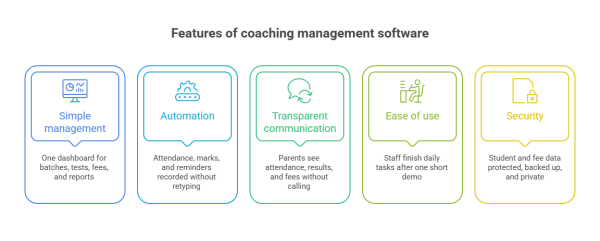
Use this checklist while you compare tools:
- Simple management: One dashboard shows batches, tests, fees, and reports.
- Automation: The tool records attendance, marks, and reminders without retyping.
- Transparent communication: Parents see progress without calling your desk.
- Ease of use: Your staff finish daily tasks after one short demo.
- Security: Student and fee data stay protected, backed up, and private.
5 features of coaching management software to check before you buy
1. Simple management of classes, tests, and fees
Simple management means one dashboard holds batches, timetables, test schedules, fees, and reports. You should see today’s classes and pending fees in under a minute. If you need three screens for that answer, the tool adds work instead of removing it.
Good coaching class management software also matches how you already work. For example, you may run morning and evening batches, and some teachers may cover two subjects. The tool must handle that without workarounds. In our experience, owners who skip this check end up rebuilding batches by hand every term.
What to look for:
- Batch, timetable, and teacher mapping in one place.
- Fee dues and receipts on the same dashboard.
- Reports that you can open without a helper.
Classpro keeps fee dues and receipts in one module, so you track payments without a spreadsheet. You can also read how a fee management system helps a coaching institute. In the demo, ask the vendor to show pending fees and the test schedule in two clicks. Then check the fee management and reports screens yourself.
2. Automation of manual tasks
Automation means the software records attendance, test marks, fee reminders, and study material sharing without retyping. Every manual entry invites errors and delays. Pick coaching management software that captures data once and reuses it in reports, parent messages, and receipts.
Start with attendance, since it feeds fees, reports, and parent alerts. Biometric attendance also stops proxy marking. As a result, your records stay honest from the first day. Next, look at test marks, because teachers lose the most time there.
What to automate first:
- Attendance through a biometric device or an app.
- Fee reminders by SMS or WhatsApp.
- Test marks that flow into progress reports.
- Study notes and homework shared in a few taps.
Classpro links biometric attendance with parent alerts and reports. For a deeper list, read our guide to coaching class automation software. In the demo, ask the vendor to mark one student present. Then watch the parent alert it triggers.
3. Transparent communication with parents
Transparent communication means parents see attendance, test results, and fee status without calling your desk. The software should send those updates by itself. Teachers should also share private feedback with one parent at a time.
Parents trust a centre that keeps them informed. Meanwhile, owners get fewer calls and fewer fee disputes. However, updates must reach parents on channels they already use, like SMS and WhatsApp. Otherwise, the messages go unread. Good coaching institute management software handles this for every batch.
What to check:
- Automatic alerts for absence, low marks, and due fees.
- A parent app or login with a clear progress view.
- Private notes from teacher to parent.
Classpro sends updates through notifications and reminders and shares progress in its student and parent app. Marks also appear in student performance reports. In the demo, ask the vendor to show exactly what a parent sees after a mock test.
4. Ease of use
Ease of use means your front-desk staff finish daily tasks after one short demo. Clean screens, clear labels, and quick support matter more than a long feature list. A tool that nobody opens wastes money.
Test this with your least technical team member, not with the vendor. Ask them to add a student, collect a fee, and mark attendance. Then count the clicks and the questions. In our experience, a tool that confuses one person confuses the whole centre.
What to check:
- Plain screens with no jargon.
- A mobile view for you and your teachers.
- Support that answers by phone or chat in your working hours.
- Help in the language your team speaks.
In the demo, ask whether your receptionist can do this alone after today. Also ask what the vendor does when your team gets stuck. Then compare how fast each vendor replies. Good coaching class management software feels simple on day one.
5. Secure and reliable platform
A secure platform protects student records, fee data, and test papers from loss, leaks, and tampering. Look for role-based access, regular backups, and a clear data policy. India’s DPDP Rules, 2025 now make this a legal matter, not only a technical one.
The Press Information Bureau explains that the DPDP Rules, 2025 carry heavy penalties. The highest is ₹250 crore, for a data fiduciary that fails to keep reasonable security safeguards. A coaching institute that stores student records can count as a data fiduciary. So confirm your duties with a legal adviser. Meanwhile, choose a vendor that explains its safeguards in plain words.
What to check:
- Separate logins and permissions for owner, teacher, and staff.
- Regular backups and a clear recovery process.
- A written policy on who can see student data.
Read how Classpro handles this on its security page. In the demo, ask what a teacher can see and what only you can see. Then compare the answers across tools.
Quick comparison: What to ask and what to avoid
Use this table during every vendor demo. A weak answer in any row is a warning sign. Score each tool before you decide.
| Feature | Question to ask in the demo | Red flag |
|---|---|---|
| 1Simple management | Can I see fees and tests in two clicks? | Data sits in separate tools |
| 2Automation | What happens after I mark attendance? | Staff retype data into reports |
| 3Transparent communication | What does a parent see? | Parents must call for updates |
| 4Ease of use | Can my receptionist do this alone? | Staff need weeks of training |
| 5Security | Who can see student data? | No clear access rules or backups |
Mistakes to avoid when you compare coaching class management software
Most buying mistakes come from rushing. Owners pick the cheapest plan, skip the trial, or trust a demo with sample data. Each mistake costs months later. Your team stops using the coaching management software and goes back to registers.
- Buying on price alone: A cheap tool that your staff avoid costs more than a good one.
- Testing with sample data: Use ten real students, one real batch, and one real fee cycle.
- Ignoring the parent view: Log in as a parent and judge what you see.
- Forgetting data export: Confirm that you can take your records with you.
For a longer list, read our guide to coaching management software mistakes to avoid. New to the topic? Start with what coaching institute management software is. Ready to compare options? See our list of the best coaching institute management software.
Pick the features that remove work
Each of these features of coaching management software answers one question: Does this give you time back? Simple management, automation, clear parent updates, ease of use, and security all do. So test each one with real data before you commit.
Start your free Classpro trial and run your own batch through all five checks. You can also compare Classpro plans and pricing first. Either way, decide with your own data, not a sales pitch.
FAQs
What are the features of coaching management software?
The core features of coaching management software are batch management, fee tracking, attendance, results, and parent communication. Good tools also add enquiry tracking, reports, and secure data storage. Check that all of them work together in one system.
What is the best coaching class management software?
The best tool is the one your team uses every day. So judge each option on the five features in this guide. Then run a trial with real data. You can also compare tools in our best coaching institute management software guide.
Which features matter most for a small coaching institute?
Start with fee tracking, attendance, and parent alerts. These three features of coaching management software save the most time and cut the most disputes. Add reports and test management as your batches grow.
How is coaching management software different from school management software?
Coaching centres run short batches, take enquiries all year, and collect fees in instalments. Schools follow fixed classes and one academic session. As a result, coaching software needs stronger enquiry, batch, and fee tools.
Is student data safe in coaching management software?
It depends on the vendor. Ask about role-based access, backups, and data policy before you buy. Also remember that India’s DPDP Rules, 2025 set penalties for weak security safeguards.
Can parents see attendance and fees in the software?
Yes, if the tool has a parent app or login. Parents should see attendance, test results, and fee status in one view. Ask for a live demo of that screen before you pay.se features help in reducing the complexities involved with running a coaching class. What do you think about these 5 requirements? Do let us know in the comments below. If you know a requirement which we may have missed in this article, do let us know in the comments.




1 Comment
I went through your blog, it’s an excellent blog. Very informative. It gives details about the benefits of coaching class management software. It’s very helpful. I recommend this blog and classtrix to everyone who is looking for more details regarding institute management software. You can visit classtrix at https://classtrix.com/