
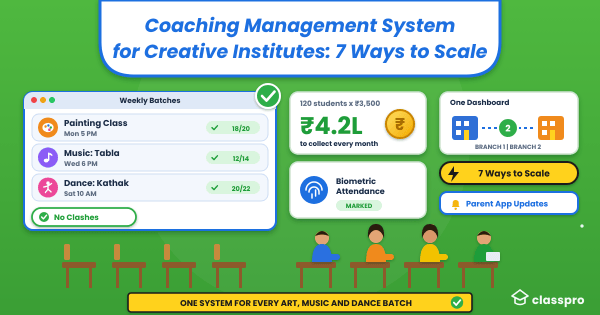

You teach painting on Monday, tabla on Wednesday, and kathak on Saturday. Meanwhile, your attendance registers, fee notebooks, and WhatsApp groups pile up at the front desk. A coaching management system takes that paperwork off your plate. This guide shows what the software does and how it helps art, music, and dance schools. You will also learn what to check before you buy.
Executive summary
A coaching management system runs attendance, fees, batches, and parent updates in one place. Art, music, and dance schools use it to give teachers more time for lessons. This guide covers seven practical ways it helps and the mistakes to avoid.
What is a coaching management system for creative institutes?
A coaching management system is a digital platform that handles the daily work of an institute. It tracks attendance, collects fees, schedules batches, and sends messages to parents. For an art, music, or dance school, it replaces paper registers with one record for every student.
IMARC values India’s coaching institutes market at USD 7.2 billion for 2025. It expects USD 8.1 billion in 2026. That figure covers coaching institutes in general, so creative schools form only a part of it. Owners also search for art class management software, but the job stays the same. If you want the basics first, read our guide to software basics.
Why do offline art, music, and dance schools need one?
Offline creative schools manage batches and fees by hand, so payments slip and timetables clash. The software keeps one live record of every student. HDFC Mutual Fund’s May 2026 note puts urban dance classes at ₹2,500 to ₹7,000 monthly.
The same HDFC Mutual Fund note lists monthly fees for urban India. It names “various public sources” and gives ranges, so treat them as a guide.
Monthly fees for creative classes in urban India
| Class type | Monthly fee in urban India |
|---|---|
| Dance | ₹2,500 to ₹7,000 |
| Music, singing, or keyboard | ₹3,000 to ₹10,000 |
| Drawing and art | ₹2,000 to ₹6,000 |
Illustrative ranges from HDFC Mutual Fund (May 2026). Bars show each range on a ₹0 to ₹10,000 scale.
Now try a simple example. Say your academy has 120 students who pay ₹3,500 a month. That adds up to ₹4.2 lakh to collect every month. If 15 families pay a week late, you chase ₹52,500 by phone. That time comes straight out of your teaching day.
How does a coaching management system help a creative institute grow?
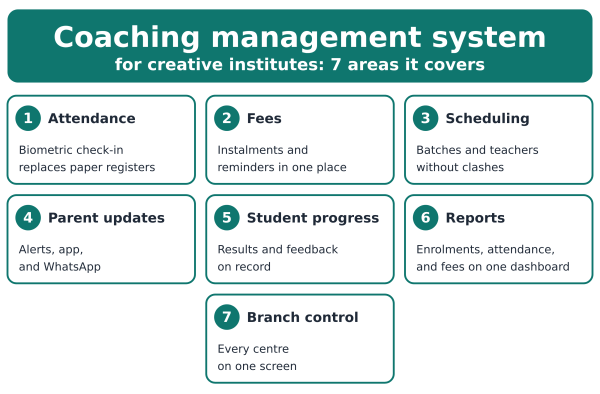
The software helps creative institutes grow by removing admin work and showing clear data. Teachers spend more time on lessons, and owners spot trends early. Seven areas matter most: Attendance, fees, scheduling, parent updates, student progress, reports, and branch control.
1. Track attendance without paper registers
Biometric attendance records each student’s entry the moment they arrive. Your teacher no longer calls names during class. As a result, you get accurate numbers for every batch. You can also see which students keep missing sessions.
2. Collect fees on time
In our experience, fee tracking eats more front-desk hours than any other task. With fee management, the system keeps every instalment and sends reminders. So your front desk stops chasing payments by phone. For more ideas, read our post on a fee system.
3. Schedule batches without clashes
A digital calendar shows every batch, teacher, and timing in one view. Then you can spot a clash before it reaches a parent. In our experience, clashes grow with every new batch. So the calendar matters more as you scale.
4. Keep parents informed
Parents want to know two things: Did my child attend, and what comes next? Notifications send absence alerts and workshop reminders on their own. Parents can also open the student app to check updates. Meanwhile, you can reach families on WhatsApp, as our WhatsApp integration post explains.
5. Show each student’s progress
Students stay longer when they can see their own growth. Student performance tools let teachers record assessment results and feedback. For example, a music teacher can log a grade exam result next to the practice notes. Parents then see steady progress instead of waiting for the annual show.
6. Read your numbers in one place
Many owners pick new courses by gut feeling. Reports show enrolments, attendance trends, and fees collected on one dashboard. You can then see which courses fill fast and which months bring the most admissions. Next, you can plan hiring and workshops around real data.
7. Run more than one branch from one screen
A second studio doubles your admin work unless one system covers both. With a single dashboard, you can compare attendance and fees across centres. Also, every branch follows the same fee rules and parent messages. Our expansion checklist walks you through the steps.
Can offline institutes use this software without going online?
Yes, an offline institute can use this software and keep every class in person. The software moves only attendance, fees, and messages into a digital system. Classes, studios, and rehearsals stay offline, so parents still meet teachers face to face.
Many creative owners worry that the software will make the institute feel cold. In our experience, the opposite happens. Teachers spend less time on registers, so they greet students and talk to parents at pickup. Your institute keeps its warm, personal feel and looks organised at the same time.
What mistakes should creative institutes avoid when choosing software?
The most common mistake is choosing software built only for school classrooms or online courses. Creative institutes need flexible batches, mixed fee plans, and quick parent updates. Compare at least three tools on those needs before you pay for any of them.
Avoid these five mistakes:
- Buying on price alone, then paying extra for add-ons later.
- Skipping the free trial, so you never test attendance and fees with real data.
- Forgetting the front-desk team, who need a short training session.
- Ignoring parent communication, which matters for retention in hobby classes.
- Failing to ask how you can export your student data.
For a longer checklist, use our comparison checklist before you shortlist tools. Ask each vendor for a demo with your own fee plans. Then pick the tool your front desk finds easiest.
How do you get started with a coaching management system?
Pick one pain point, such as fee tracking, and trial the software for two weeks. Import your student list, then invite one teacher to mark attendance. Review the first month’s reports before you add parents and extra branches to the system.
Small steps keep your team calm. You can add features whenever your staff feel ready. In our experience, teams adopt software faster when the first win comes within a week.
Next steps for your creative institute
Your passion for art, music, and dance deserves a partner that handles the paperwork. Classpro offers software for coaching classes and creative institutes alike. You can start a free trial today. Or you can compare plans and pricing first.
FAQs
What is a coaching management system, and how does it help art, music, or dance schools?
A coaching management system is software that runs attendance, fees, batches, and parent messages from one dashboard. Art schools, music academies, and dance studios use it to replace registers and spreadsheets. As a result, teachers spend more time mentoring students and less time on paperwork.
Why do offline creative institutes need coaching management software?
Offline institutes juggle studios, instruments, batches, and staff timetables by hand, which causes errors and wasted time. The software keeps attendance, fees, and schedules accurate in one place. Your institute then runs smoothly while every class stays fully in person.
How can software improve student retention?
Parents stay loyal when they get timely updates, so automatic reminders and progress notes build trust. Students stay motivated when they can see their milestones. In our experience, families stay longer when you follow up on every absence within a day.
Can a coaching management system handle several branches?
Yes, one dashboard can run several branches of your art school, music academy, or dance studio. You can compare attendance, fees, and student numbers across every centre. This keeps fee rules and parent messages the same as you open new locations.
Is coaching management software suitable for small creative schools?
Yes, this software suits small creative schools with only a few batches. They use it to track fees, attendance, and classes without extra admin staff. Larger academies add reports and multi-branch control. So you can start small and grow into the rest later.
How is Classpro different from other coaching management software for creative institutes?
Classpro is coaching class management software that also serves art, music, and dance schools. It combines biometric attendance, fee management, batch scheduling, and mobile access for students, teachers, and parents. The software focuses on modernising your office work while your institute keeps its personal touch.