


A parent calls to ask if tomorrow’s test is still on. You scroll through three WhatsApp groups and a fee register to find out. Then another parent asks about last month’s pending fee. A free coaching management app can put those answers in one place. This guide shows five you can try this week.
Executive Summary
Most free coaching apps start with a free trial or a free core plan. Each free coaching management app below helps you manage classes online. Their free offers differ. Platfer calls its core platform free, while Smart Classes and Classpro give free trials. VidyaHQ and GoCoaching show no price on the pages we checked, so ask before you commit.
What a free coaching management app does
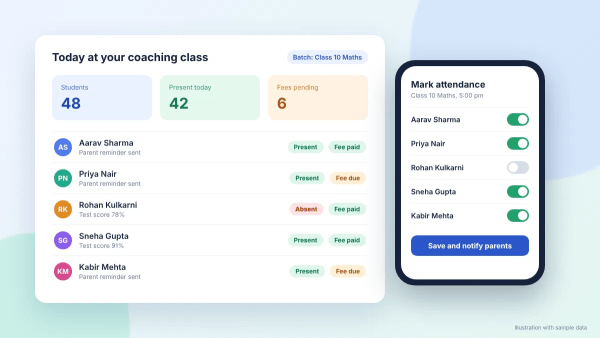
A coaching management app keeps your daily admin on your phone. It tracks students, batches, attendance and fee dues in one login. Most apps also send reminders to parents, so you don’t have to chase payments by hand. If you want the basics first, our guide to management software explains how these tools work.
The market behind these tools keeps growing. IMARC sizes India’s coaching institutes market at USD 8.1 billion in its 2026 update. That’s up from USD 7.2 billion in 2025. As a result, more owners now look for affordable tools.
Tasks a free coaching management app can cover
- Student records: Names, batches and parent contacts sit in one list.
- Attendance: Staff mark it from a phone, or from a biometric device where the app supports it.
- Fee tracking: You can see who paid, who owes and who needs a reminder.
- Parent updates: You can send test dates and holiday notices without a group chat.
- Reports: You can check collection and attendance summaries before you plan the month.
Limits to expect on free plans
In our experience, free plans ask you to watch four limits:
- Student caps: Free tiers often limit how many students you can add.
- Branding: A student app with your institute’s name may cost extra.
- Support: Free users may wait longer for help.
- Data export: Check that you can download your records if you leave.
Free coaching management app options
We checked each free coaching management app’s own page in October 2026. Where a page doesn’t state a price or limit, we say so. Use these notes to shortlist, then confirm the details with each vendor.
1. Smart Classes
Smart Classes offers a free trial with every feature of its paid membership. Its admin app and its SMART STUDENT app are both free to download. You can handle fee instalments, receipts and reminders from the app. Staff can also mark attendance from a phone or a biometric device. The page shows no price, so ask about plan costs during your demo.
2. Platfer
Platfer states that its core teacher platform is free. It combines coaching management features with learning tools for online and offline classes. Of the five apps here, Platfer is the only one whose page calls its core platform free. However, the page doesn’t list limits on students or features. So check its pricing section before you add your full list.
3. VidyaHQ
VidyaHQ is an Android app for coaching institutes, tuition centres and private teachers. Its Google Play listing covers students, attendance, fee collection, invoices, branches and batches. The listing also mentions notifications, reports and a student app. It shows 500+ downloads and an update on 2 September 2026. The listing doesn’t state a price, so confirm costs before you add students.
4. GoCoaching
GoCoaching lists ten features on its site. They include auto payment reminders, batch management, branch management and attendance management. The list also names an integrated SMS panel, collection reports and expense management. The site shows no free plan or price, only a contact form for pricing. Call or message the team to learn what a trial includes.
5. Classpro
Classpro gives you a 7-day free trial with its full suite of features. You can collect fees online and track biometric attendance from one login. Parents follow updates in the Classpro app, and students check homework there. Teachers can also record test performance for each student. After the trial, you contact the sales team to pick an annual plan.
How the five options compare
The table below sums up what each free coaching management app page says about free access. Details change often. So confirm them with each vendor before you decide.
| App | What free means | Check before you start |
|---|---|---|
| SSmart Classes | Free trial and free app downloads | Plan price |
| PPlatfer | Free core teacher platform | Student and feature limits |
| VVidyaHQ | Not stated on the listing | Price and plan terms |
| GGoCoaching | Not stated on the site | Free plan or trial |
| CClasspro | 7-day free trial, full suite | Annual plan price |
How to choose a free coaching management app
Start with the jobs your free coaching management app should fix first. Then test each app against that list during its free trial. A week is enough to spot the gaps.
- Fees: Can you record part payments and send reminders?
- Attendance: Can your staff mark it quickly from a phone?
- Parent updates: Do parents get alerts in an app, by SMS or on WhatsApp?
- Reports: Can you see monthly dues and attendance in one report?
- Exit: Can you export your student data if you leave?
Your size matters too. A single tutor needs attendance and fee tracking first. A multi-teacher institute also needs batches, branches and reports. So pick the app that fits your size, then test it with one real batch.
Free tools to pair with an app
Several free tools to manage coaching class tasks work well beside an app. These online tools for coaches work on any smartphone. You probably use some of them already.
- Google Sheets: Keep a backup of your student list that you control.
- Google Calendar: Share your lecture and test schedule with teachers.
- WhatsApp Business: Send parents reminders using ready-made message templates.
- YouTube: Upload recorded lectures for students who missed a class, using these YouTube tips.
Our guide to free online tools lists twelve tools, with each plan’s limits. Meanwhile, if your institute outgrows free plans, compare paid options side by side. That way you can choose with real feature lists in hand.
Mistakes to avoid with a free coaching management app
- Skipping the demo: Ask for a live walkthrough using your own batch structure.
- Loading every student at once: Start with one batch for a week.
- Surprising parents: Tell them where updates will arrive before you switch.
- Running two fee records: Keep one source of truth, or your dues will clash.
Conclusion
A free coaching management app lets you test a new way of working before you spend anything. Smart Classes, Platfer, VidyaHQ, GoCoaching and Classpro each give you a place to start. Shortlist two, run one batch through each, and keep the one your staff actually opens. If you want fees, attendance and parent updates in one login, start Classpro’s free trial. You can also check Classpro’s plans before you decide.
FAQs
Is there a free coaching management app for small tuition classes?
Yes. Platfer says its core teacher platform is free, and Smart Classes and Classpro offer free trials. Check each page for student limits before you add your full list. A free trial with every feature helps you judge the fit.
Which app is best for coaching classes?
It depends on your size and tasks. A single tutor needs attendance and fee tracking. A multi-teacher institute also needs batches, branches and reports. So test two apps with one real batch each.
Can I manage classes online without paying?
You can manage classes online with free tools like Google Calendar, Google Sheets and WhatsApp Business. These work well for small batches. However, fee tracking and parent reports get harder as your numbers grow.
What happens when a free trial ends?
It depends on the vendor. Classpro says its 7-day trial has no automatic charge, and you contact sales to subscribe. For other apps, ask whether they keep your data if you stop.
Do free coaching apps work on Android and iPhone?
Smart Classes lists its apps on both Play Store and the App Store. The VidyaHQ listing we checked is on Google Play. So confirm platform support before you roll an app out to teachers.
Should I use a free app or a spreadsheet?
A spreadsheet works for one batch. Once you have several batches, fee reminders and attendance, an app saves time. In our experience, owners often start with sheets and move to an app later.