

Coaching institute owners, you hold student names, parent phone numbers, home addresses, and fee records. That makes data safety a daily job, not an IT topic. Trusted coaching management software keeps this data in one protected place, with clear access rules. This guide shows five safeguards to check before you trust any platform with student records. We also show how Classpro handles each one.
Most owners think about data security only after something goes wrong. Someone loses a laptop. A spreadsheet reaches the wrong person. A teacher who left still has last year’s fee records. By then, the parents’ trust is already hurt.
What makes coaching management software trusted?
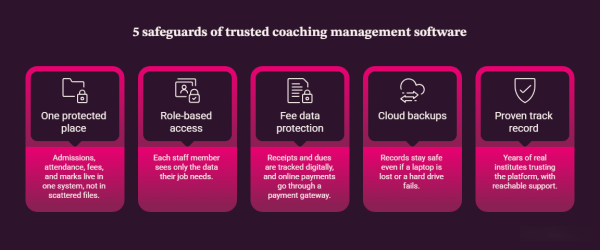
Quick answer: Trusted coaching management software does five things. It stores records in one protected system and limits access by role. It also secures fee data, backs up everything, and has a real track record. If a platform misses even one of these five, your student data stays at risk. Check all five before you sign up.
The stakes are real. IBM’s 2025 report found that the average data breach in India cost ₹22 crore. That figure covers organisations across many sectors, so a small institute will face a smaller bill. Even so, a breach costs money, time, and parent trust.
The law is also moving. India notified its DPDP Rules in November 2025, and most duties start around May 2027. The Act allows penalties of up to ₹250 crore for failing to keep reasonable security safeguards. So choosing secure coaching management software now saves you a scramble later.
5 safeguards of secure coaching management software
1. One protected place for every record
Quick answer: Scattered files cause more data loss than hackers do. Secure coaching management software brings admissions, attendance, fees, and marks into one system. You then know where your data lives and who can reach it.
Think about how your data sits today. Student details sit in one Excel file, and fee records sit in another. Attendance lives in a register, and parent chats sit on a teacher’s personal phone. One lost device can expose all of it.
Classpro puts these records in one platform instead. Your front desk can manage enquiries and leads. Your team can track fee collection in the same system. So you secure one system instead of ten files. For more on fee records, read how a fee management system helps coaching institutes.
2. Role-based access for every staff member
Quick answer: Role-based access means each person sees only the data their job needs. Your front desk does not need fee reports, and your accountant does not need to edit marks. This single control prevents many accidental leaks.
In most Excel setups, anyone with the file can see and change everything. A single wrong edit can alter a fee record or a test score. Nobody notices until a parent complains.
Classpro uses permission-based access across the platform. A teacher can mark attendance and update marks, but cannot open fee collections unless you allow it. Classpro’s security page says it encrypts user passwords straight away. It also logs sessions off after inactivity. As a result, a staff member who leaves loses access the day you remove them.
3. Extra protection for fee and payment data
Quick answer: Fee data is the most sensitive data you hold. Secure software limits who can view it and tracks every receipt and due digitally. It also routes online payments through a payment gateway. Parents then never hand card details to your staff.
Parents trust you with payment details. One mishandled receipt can damage your name, whatever your teaching results are. Loose paper receipts can be lost, copied, or changed.
Classpro tracks receipts, pending dues, and instalment schedules digitally, and only authorised staff can open them. Online payments run through integrated gateways such as Razorpay. Parents pay through that channel instead of sharing bank details with your team. You also keep a clear record for every payment, which helps when a parent disputes a fee.
4. Cloud backups for lost or damaged devices
Quick answer: Backups protect you when thieves take a laptop, a hard drive fails, or a register gets wet. Cloud-based software keeps your records on secure servers, not on one device. Your data stays safe and reachable even if your hardware fails.
Ask any owner who lost a hard drive, and they will describe the panic. Years of records can vanish in a minute. Registers also burn, tear, and get damaged by water.
With Classpro, your data sits on a cloud platform, not on one local computer. Classpro’s security page says a firewall protects its servers. It also says TLS 1.2 and 1.3 secure all traffic. So a lost device does not mean lost records. You can log in from another phone or laptop and carry on.
5. A long track record with real institutes
Quick answer: Anyone can claim security. A track record is harder to fake. Look for software that institutes have trusted for years. It should also have a support team you can reach.
Classpro has served coaching institutes for over a decade, and thousands of institutes across India use it. Owners tell us they value reliable data handling and quick support equally. When something feels wrong, you want a person to call, not just a help page.
You can also read how other owners made the switch. Our post on why institutes resist coaching institute ERP covers the common worries. It also explains how owners got past them.
How to check secure coaching management software before you buy
Quick answer: Ask every vendor the same five questions, then compare the answers side by side. A trusted vendor answers each one clearly and shows proof. A vague answer is a red flag.
| Question to ask | What a good answer sounds like | Red flag |
|---|---|---|
| 1Where is my data stored? | One cloud platform with a firewall and TLS | Files on staff laptops |
| 2Who can see fee data? | Only roles you approve | Everyone with a login |
| 3How do parents pay online? | Through a payment gateway | Bank details shared with staff |
| 4What happens if my device is lost? | Data stays safe in the cloud | Records live on that device |
| 5How long have you served institutes? | Years of named, real customers | No customers you can call |
Use the table during demos. You can also compare feature lists in our guide to the best coaching institute management software. If you are new to this category, start with what coaching institute management software is.
Mistakes to avoid when choosing coaching management software
Quick answer: Most owners pick software on price or looks and check security last. That order is backwards. Check data safety first, then compare features.
- Trusting a demo alone: Ask to see the roles and permissions screen yourself.
- Sharing one login: A shared password makes it impossible to see who changed a record.
- Ignoring backups: Ask where the data lives before you ask about price.
- Skipping staff training: Your team needs to know why access limits exist.
Our post on coaching management software mistakes to avoid lists more. Also, add reports to your checklist. Classpro’s reports feature shows owners what is happening across the institute. Meanwhile, the parent and student app and notifications keep parent chats inside one system.
Protect your students’ data with Classpro
Ask yourself one question. If your laptop or registers disappeared tomorrow, would your students’ data be safe? If the answer worries you, a dedicated system is your next step. You do not need technical skills to start. Your team will learn it quickly.
Start your free trial to see the role settings and fee tracking yourself. It costs nothing to check. You can also compare plans and pricing before you decide.
FAQs
How do I identify trusted coaching management software?
Look for four things: One central system, role-based access, protected fee data, and cloud backups. Then check the vendor’s track record with real institutes. Software that institutes have used for years is a stronger signal than any claim on a website. Classpro offers all of these, and you can test them in a free trial.
Is data security really important for coaching institutes?
Yes, because you hold sensitive data about minors and their families. That includes names, contact details, addresses, exam scores, and payment records. A leaked spreadsheet or lost laptop can damage parent trust for good. India’s DPDP Act also expects organisations to keep reasonable security safeguards.
How can I safeguard my coaching institute from data theft?
Stop keeping student and fee data in many files and on personal phones. Move to a central system with role-based access. Use a payment gateway for online fees, and keep your data in the cloud. Also remove staff access on their last working day.
Why is role-based access control important in coaching management software?
It limits what each staff member can see and change. A teacher can update attendance and marks without opening fee collections. This prevents accidental leaks and silent record changes. It also shows you who did what, which helps when you review a mistake.
How does Classpro protect fee and payment data?
Classpro limits fee records to authorised staff and tracks receipts, dues, and instalments digitally. Online payments run through integrated payment gateways. So parents do not share card or bank details with your team. Classpro also secures traffic with TLS 1.2 and 1.3, as its security page explains.