



Walk into a busy coaching institute at 8 a.m. in exam season. Parents queue at the fee counter, and students wait to mark attendance. Teachers swap classrooms while a coordinator chases a no-show. The owner answers ten questions at once, with no coaching institute ERP to help.
Many owners still run this chaos on paper registers and Excel sheets. It feels fine until pending fees pile up and timetables clash. Then a coaching institute ERP starts to look useful, yet most owners still hesitate. They see an extra expense or a complex tool.
This guide shows why owners resist and what the delay costs. It also shows how to start in 60 days. You will get a simple ROI example, a team checklist, and six FAQs. Let’s begin with the doubts you probably have today.
Why institutes resist coaching institute ERP
Quick answer: Owners resist coaching institute ERP for six reasons. They think the old setup works, fear complexity, and worry about cost. Data migration, vendor trust, and the offline myth also hold them back. Each worry has a practical fix, so you can start small with fees and attendance.
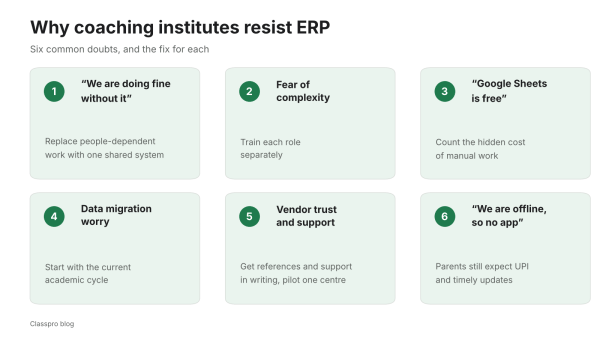
1. “We’re doing fine without it”
A familiar setup feels efficient. Fee receipts sit in a file, attendance lives on paper, and updates go out on WhatsApp. However, “fine” often hides double entries, lost records, and late notifications. Growth then turns these small gaps into long queues and timetable clashes.
Here is the real issue: Your processes depend on one or two people. When your main admin leaves, work quality drops overnight. As a result, the chaos starts again.
2. Fear of complexity and training fatigue
Owners worry that the team will resist a new system. You may hear, “My counsellors are not tech-savvy,” or “Faculty won’t mark attendance.” These worries are valid. Most of them come from poor rollouts, so the software itself is rarely the cause.
So pick a coaching institute ERP that mirrors your real workflow: Fees, batches, exams, and attendance. Then train each role separately. Adoption is usually faster than owners expect.
3. “ERP is expensive, and Google Sheets is free”
The subscription fee is easy to see. Manual work has a hidden cost that rarely shows up in your profit and loss statement. It includes hours spent chasing dues, missed reminders, concession errors, and weak lead follow-up. Your own time also disappears into daily firefighting.
If you want a primer on what you are buying, read this guide to management software. It explains how the tools work. Then compare the subscription with the hidden costs below.
4. Data migration anxiety
Owners ask how to move old records and what happens if the data is wrong. You do not need to move everything on day one. Start with the current academic cycle and add past data later. A good vendor gives you import templates, validation checks, and steady support.
5. Vendor trust and support worries
The biggest fear is being left alone after sign-up. So ask for references from institutes of your size. Get post-go-live support in writing. Also start with one centre before you scale to all of them.
6. “We are an offline institute, so we don’t need an app”
Offline institutes still run on real-time coordination. Your front desk, faculty, and parents all need the same updated information. An institute ERP speeds up the fee counter, attendance, and parent alerts.
Your parents also live on their phones. According to NPCI data reported by PTI, UPI processed 24.51 billion transactions in August 2026. Parents expect to pay and get updates the same way.
The hidden costs of avoiding coaching institute ERP
India’s coaching institutes market is worth about USD 8.1 billion in 2026, according to IMARC. With that much competition, small leaks add up. These six costs rarely appear on a report, yet you pay them every month.
Revenue leakage you cannot see
- Missed fee reminders: Parents forget, and a big chunk of money stays pending.
- Concession errors: Manual entries create gaps between your ledger and your receipts.
- No centre-wise view: Multi-centre owners spot rising dues only at month-end.
In our experience, automatic reminders can lift fee collection by 3 to 5%. Our fee collection tips cover the habits that help. A tool for fee management then tracks every instalment for you.
Slower decision cycles
When admissions, fees, and attendance sit in different places, you decide late. You open extra batches late. You also pause weak subjects later than you should. Daily reports bring all this data into one view.
Attrition from poor parent communication
Offline institutes thrive on trust. Parents get restless without timely news on schedules, results, dues, or teacher feedback. Manual WhatsApp lists work for small batches. In our experience, they start to break beyond 500 students, because updates get missed, repeated, or delayed. Automated notifications keep every parent informed without extra effort from your staff.
Faculty under-use and timetable clashes
Without a master timetable, two strong teachers get the same slot. Meanwhile, your prime evening slots stay half empty. That is lost capacity, and you pay for it in teacher salaries.
Audit and compliance stress
GST invoices, discounts, refunds, and bank reconciliation become last-minute marathons. You may stay compliant, but your staff pay for it with long nights. A shared record with approval trails removes most of this stress.
Owner dependency and burnout
If every task needs you, your institute can only grow as fast as your time allows. An ERP moves routine work into automated steps. As a result, you get time to plan expansion instead of solving daily issues.
What a coaching institute ERP should include
Not every ERP suits coaching. Look for these coaching-specific modules. Each one solves a daily problem.
Admissions and lead-to-admission CRM
- Capture enquiries from walk-ins, calls, and local ads.
- Give counsellors follow-up reminders and a dashboard.
- Track the source of each lead and the conversion rate.
- Use Classpro’s enquiry management to run this stage.
Fees and finance
- Print receipts fast for cash, card, and UPI payments.
- Handle partial payments, late fees, and concessions with approval trails.
- Send automatic reminders and track promised dates.
- Export GST-ready data for your accountant.
Batches, timetable, and attendance
- Create batches by course, level, and subject.
- Allocate rooms and teachers with clash checks.
- Mark attendance by biometric attendance to save time and stop proxies.
Assessments and results
- Schedule exams and enter objective or subjective marks.
- Issue result slips and performance dashboards for students, parents, and academic heads.
- Share study material and assessments for students to download.
- Show each student’s progress on a performance dashboard.
Communication
- Send role-based alerts to parents, students, faculty, and admins.
- Use ready templates for dues, schedule changes, exam news, and parent meetings.
- Give parents a student app for results and updates.
Multi-centre controls
- See branch-wise admissions, collected fees, and pending dues.
- Keep one course catalogue and one price list.
- Set user roles, approvals, and audit logs.
- Plan a second branch with our branch expansion checklist.
Reports and insights
- Check daily collections, aging of dues, and counsellor productivity.
- Track batch fill rates and classroom capacity.
- Watch drop-offs from admitted to active to dropped out, month by month.
Classpro offers coaching-specific modules for fees, batches, attendance, assessments, and notifications. It suits offline institutes that run on daily batch workflows. Its modules mirror the sections above.
A simple ROI example for coaching institute ERP
Let’s take a two-centre institute with 500 students. Each student pays ₹3,000 a month on average. Here is how better fee collection changes the numbers.
| Item | Amount per month |
|---|---|
| Total fees due500 students at ₹3,000 each | ₹15 lakh |
| Collected at 92%Manual follow-up | ₹13.8 lakh |
| Collected at 96%With ERP reminders | ₹14.4 lakh |
| Extra collection₹7.2 lakh a year | +₹60,000 |
Illustrative example. The 92% and 96% rates are assumptions, not Classpro client results.
That extra ₹60,000 a month adds up to ₹7.2 lakh a year. Compare that figure with the yearly quote you receive from any vendor. This example is illustrative. The 92% and 96% rates are assumptions, not results from a Classpro client.
Fee collection is only the start. You also save front-desk time, reduce refund disputes, and free your staff for teaching. Meanwhile, parents get a smoother experience.
A 60-day setup plan for coaching institute ERP
If you feel unsure about going digital, this plan keeps the risk low. You do the basics first, and you add the rest later. Each step is small and measurable.
Days 1 to 30: Get the basics right
- Students and batches: Add current students, batches, and fee plans. Skip old years for now.
- Fee collection: Start receipts, track UPI payments, and turn on automatic reminders.
- Attendance: Set up biometric attendance and train your staff in one hour.
- Owner dashboard: See daily collections, pending fees, and absentees at a glance.
- Result: Fee collection gets easier, attendance turns accurate, and you see everything in one place.
Days 31 to 60: Run smoothly and grow
- Timetable: Build schedules with zero clashes.
- Exams and results: Run tests, publish marks quickly, and share progress with parents.
- Parent communication: Send standard SMS or app alerts for fees, exams, and updates.
- Reports: Track admissions, fees, refunds, enquiries, and performance together.
- Result: You run a managed system, collections improve, staff effort drops, and parents stay informed.
How to bring your team along
- Train by role: Teach the front desk receipts and attendance. Teach counsellors follow-ups, and academic heads timetables and exams. Do not give everyone the whole system at once.
- Pilot one batch: Run the first 3 to 4 weeks with one grade or subject. Fix the main issues quietly, then roll out to everyone.
- Publish three success metrics: For example, cut fees pending beyond 30 days by 30%. Publish test results within 48 hours. Aim for zero timetable clashes this month. Celebrate each win in public.
- Lead by example: If you grant discounts on WhatsApp, your staff will copy you. Move approvals into the ERP so everyone sees who approved what.
- Keep paper as a safety net: Allow paper registers for the first month. Make it clear that the ERP is the source of truth.
How to choose the right coaching institute ERP
Use this checklist when you compare vendors. Our post on common mistakes shows what goes wrong. Our best software list compares popular options.
- It fits coaching: Batches, packages, split payments, concessions, and GST all work out of the box.
- It is quick to use: Receipts take under 10 seconds, and attendance does not slow your faculty.
- It gives you control: Role-based access, approval workflows, and audit trails protect your data.
- It reports clearly: You get branch-wise and combined dashboards, plus exports your CA can use.
- It supports onboarding: Look for data upload help, phone or WhatsApp support, and training videos.
Classpro covers these points with coaching-first workflows. It handles fees, fast attendance, and parent communication. All of it sits in one system.
School ERP vs coaching ERP: Which do you need?
A school ERP and a coaching ERP look similar, but they follow different calendars. Coach Sutra made the same point in May 2026. Its advice is to choose by how your institute really runs.
| Area | School ERP | Coaching ERPBuilt for batches |
|---|---|---|
| Academic cycle | Fixed annual cycle | Admissions all year |
| Classes | Fixed classes | Flexible batches |
| Fees | Term-based | Course-based instalments |
| Timetable | Stable | Changes often |
A coaching institute on school software faces extra steps for simple tasks. Mid-year admissions and batch changes make this worse. That is why a coaching-first ERP saves time every day.
Five myths about coaching institute ERP
“It will slow us down”
A poorly chosen system will slow you down. A coaching-first ERP speeds up daily tasks. These include receipts, attendance, timetable changes, and alerts.
“My staff can’t handle it”
If your staff can handle fee registers and WhatsApp groups, they can handle role-based screens. Each person sees only the screens they need. Focused training and clear steps make the difference.
“Parents don’t care about apps”
Parents care about timely news on dues, schedules, and results. Whether it arrives by SMS or app, consistency builds trust. Late news is what worries them.
“We’ll lose the personal touch”
Automation takes over the logistics. Your team then has more time for academic attention, parent meetings, and counselling. Teachers and counsellors keep the relationship.
“We must digitise everything on day one”
You can take it slowly. Start with fees and attendance, then add the timetable and exams. Scale in phases.
Next steps for your institute
Offline coaching in India is competitive and brand-driven. The best teachers matter, and so do the best operators. Software supports your teaching with reliable, repeatable operations.
Map your current processes, run a pilot, and measure the outcome. In 60 to 90 days, you will know the answer from numbers and calmer days. If it does not work for you, you lose very little and gain clarity.
Ready to try? Pick your next step:
- Start a free trial and test it with your own batches.
- Compare Classpro plans before you decide.
FAQs
What is a coaching institute ERP?
A coaching institute ERP is software that runs your daily operations in one place. It covers enquiries, admissions, fees, batches, attendance, exams, and parent communication. It also gives you reports for every centre.
Why do coaching institutes resist ERP?
Owners usually resist for six reasons. They think the old setup works, fear complexity, or worry about cost. Others dread data migration, doubt vendors, or feel offline institutes need no software. A small pilot answers most of these worries.
Is coaching institute ERP worth it for a small institute?
It often is when fee follow-ups and attendance take much of your time. Run the ROI example above with your own student count and fee. Then compare the extra collection with the yearly quote.
How much does ERP for a coaching centre cost in India?
Prices vary by vendor, student count, and modules. Classpro’s plans page lists current plans and a free trial. Ask every vendor for a written annual quote before you decide.
How long does it take to set up ERP software for a coaching institute?
Most institutes can cover the basics in 30 days and the full workflow in 60 days. Start with fees and attendance, then add timetable, exams, and reports. A pilot batch keeps the rollout calm.
What is the difference between school ERP and coaching ERP?
School ERP follows a fixed annual cycle with set classes. Coaching ERP handles flexible batches, year-round admissions, and instalment fees. Choose the one that matches how your institute runs.


2 Comments
Nice Article.
Good and informative article classpro. ERP software is very useful for small to mid sized coaching institutes.