


Picture a parent asking you to remove their child’s details after a trial month. You also find duplicate leads from last season’s enquiry drive. You want to delete student records permanently. However, you worry about losing fee or attendance history. This guide shows what Classpro removes, what to check first, and how to delete safely.
Delete student records permanently: Quick answer
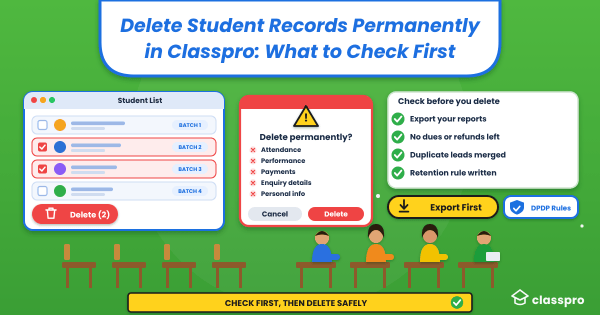
You can remove a student for good from your student list in Classpro. Classpro then removes that student’s attendance, performance, admission, payment and enquiry records. The student also leaves their batch automatically. You cannot reverse the deletion, so export what you need first.
What Classpro removes when you delete student records permanently
Classpro links every record to a student or a lead. So when you delete one, the linked records go with it. The two cases work a little differently.
Deleting a student
When you delete student records permanently, Classpro removes everything tied to that student:
- Attendance reports
- Performance reports
- Admission and payment reports
- Enquiry details
- Personal information
Classpro also removes the student from their batch. So you do not need a separate clean-up step. Check your batch strength afterwards.
Deleting a lead
When you permanently delete leads, the clean-up is smaller. Classpro removes the enquiry details, the follow-ups, and the personal information. Your students and batches stay as they are. Therefore, check each lead before you delete it.
Five checks before you delete student data
Classpro asks you to confirm. However, the prompt cannot tell you what you still need. So run these five checks first. Each one takes only a few minutes.
Export the records you may need
Download the reports you might want later. Most institutes need four things:
- Fee and payment history from fee management.
- Attendance logs from biometric attendance.
- Test and exam results from student performance.
- Any summary you need from your reports.
Confirm no dues or refunds remain
Check the student’s fee status before you delete. Ask yourself whether the student still owes fees or expects a refund. Also ask whether a parent could request a fee receipt later. In our experience, institutes keep the payment trail for as long as their accountant advises. This guide to fee management systems shows how to track dues.
Merge duplicate leads before you delete
Keep the lead with the fullest follow-up history. Then delete the extra leads that add nothing new. Track every enquiry in enquiry and lead management. This lead management guide explains how to keep the list clean.
Agree who can click delete
Decide which one or two people in your team may delete records. Everyone else should ask them. As a result, you avoid accidental deletions during a busy admission week.
Check your retention rule
Next, check how long you plan to keep student data after a student leaves. The next section explains why this matters in India today. Write the answer down before you delete anything.
How to permanently delete student records in Classpro
The steps below follow the confirmation message Classpro shows.
- Open your student list, or your leads list.
- Tick the students or leads you want to remove.
- Click the delete option.
- Read the confirmation message. It warns that deletion is permanent and lists what goes with the record.
- Click Delete to confirm, or click Cancel to stop.

Student record retention and the DPDP Rules
In India, student data now carries legal weight under the Digital Personal Data Protection (DPDP) Rules. SCC Online reports that India’s IT ministry notified the DPDP Rules on 13 November 2025. Most duties start 18 months later, on 13 May 2027.
In general, you must erase personal data once its purpose ends. A law that requires retention is the exception. So write a simple student record retention rule now.
Ask your lawyer or chartered accountant which records you must keep. This guide is not legal advice. Their answer sets your retention period.
Mistakes to avoid before you delete records
Most regrets about deleting student records permanently come from a few repeat habits. This table shows each one and the safer habit. Avoid all five.
| Mistake | Safer habit |
|---|---|
| Deleting without an export | Download fee, attendance and result reports first |
| Deleting a student with pending fees | Clear the dues and note the payment trail |
| Deleting to fix a typo | Edit the record and keep it |
| Letting anyone delete | Name one or two people who may click Delete |
| Skipping the confirmation message | Read it, because it lists what leaves with the record |
Conclusion
You now know how to remove records for good, and what to check before you start. Export what you need, confirm with your team, and then delete. Pause before every delete, because Classpro cannot restore a record afterwards.
Want one place for student, fee and lead data? Start your free trial or compare pricing. You can also read what coaching institute software does, and which software mistakes to avoid.
FAQs
Can I undo it after I delete student records permanently?
No. Classpro cannot restore a deleted student or lead. The deletion also removes every linked record. So export your reports before you click Delete.
What does Classpro delete when I remove a student?
Classpro removes the student’s attendance, performance, admission and payment reports. It also removes the enquiry details and personal information. Finally, it removes the student from their batch.
What happens when I permanently delete leads?
Classpro removes the lead’s enquiry details, follow-ups, and personal information. Students and batches stay as they are. Therefore, convert any lead you still want before you delete.
Should I delete student data when a student leaves?
It depends on your records policy and the law. The DPDP Rules say you must erase personal data once its purpose ends. A law that requires retention is the exception. So ask your accountant or lawyer first. Then set one clear retention period for all students.
How do I keep my fee history before I delete a student?
Export your fee and payment reports before you delete. Classpro removes admission and payment reports along with the student. So keep your own copy of anything your accountant needs.
Does deleting a student remove them from their batch?
Yes. Classpro removes the student from their batch automatically. You do not need to remove them by hand first. Check your batch strength afterwards.