


It is 9 pm, and your admin staff is still matching paper registers with fee receipts. One wrong entry means a parent calls tomorrow, and you lose an hour to fix it. Coaching class management should not eat your evenings like this. This guide shows four tasks you can automate. Your team then spends less time on data entry and more time on students.
Quick answer: What can you automate in coaching class management?
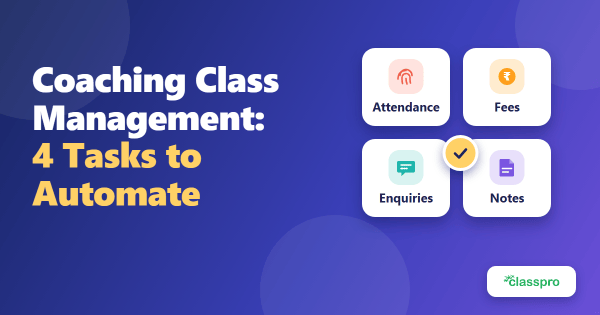
Automate four tasks first: attendance, fee collection, enquiry follow-ups, and document sharing. Each one cuts repeat data entry and gives parents faster updates.
Here is the short version:
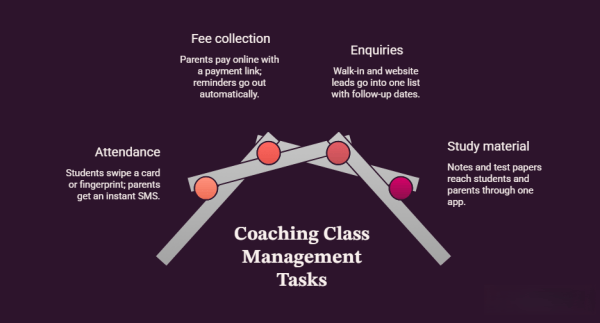
- Attendance takes seconds: Students swipe a card, and parents get an SMS.
- Fee collection runs without calls: Parents pay online, and reminders go out on their own.
- Enquiries stop slipping: Every walk-in and website lead lands in one list with a follow-up date.
- Study material reaches everyone: Notes and test papers go to students through one app.
Why does manual work slow down coaching class management?
Manual work slows coaching class management because staff type, check, and fix the same data repeatedly. Every extra step adds a chance for error.
Most coaching classes start small. The owner tracks attendance in a register, fees in a notebook, and enquiries on loose slips. That works for 30 students. However, it breaks at 300 students, because staff spend hours on data entry and mistakes pile up. In our experience, one missed fee reminder or lost enquiry costs more than the software would.
Good coaching institute management software replaces these repeat steps. So let us look at where to begin.
Which tasks should you automate first?
Start with tasks that repeat daily and involve parents: attendance, fees, enquiries, and study material. These four save the most staff time and build trust fastest.
1. Automate attendance with biometric devices
A biometric device records attendance in seconds and texts parents on arrival, exit, or absence. Your staff no longer call roll or fill registers.
Manual roll call eats into class time. Biometric hardware removes that step. Students touch a fingerprint reader or swipe a smart card, and the system logs the time. Parents then get an automatic SMS when their child arrives, leaves, or misses class.
You can read the full process in our attendance automation guide. Meanwhile, the biometric attendance feature shows how the device and reports work together. As a result, parents feel sure their child is safe.
2. Collect fees online and send reminders automatically
Online payment links and automatic reminders collect fees faster, without staff phone calls. Parents pay from home, and your records update on their own.
Chasing pending fees is the most awkward job in any coaching class. An online payment gateway removes most of it. Parents pay by UPI, card, or net banking from one link. The system records each payment straight away.
India’s digital payment habit is strong. UPI processed 24.07 billion transactions in September 2026, according to NPCI figures reported by Outlook Money. That shows how comfortable Indian families already feel with digital payments.
Pending fees also trigger an automatic SMS with a payment link. For more ideas, read our fee collection tips for coaching classes. The fee management feature handles reminders and payment links in one place. Also, the notifications and reminders feature keeps parents informed by SMS.
3. Track enquiries and follow-ups in one place
A lead tool records every enquiry and reminds you when to follow up. You lose fewer admissions to forgotten calls.
Walk-in enquiries often live in a notebook. Website enquiries land in your inbox. Then nobody knows who called back. An enquiry tool puts both sources in one list with a status and a follow-up date.
Classpro also gives you a free web enquiry plugin for your website. After you add it, every form fill enters your list automatically. Our guide on how to increase leads for your coaching institute covers follow-up rules in detail. Next, open the enquiry and lead management feature to see the full flow.
4. Share notes and test papers through an app
A student and parent app shares notes, answer papers, and updates in one place. Everyone sees the same information, so nobody has to ask.
Printed notes cost money and time. Students lose paper copies, and parents rarely see them. With the Student and Parent App, you upload a file once. Students then open it on Android or iOS. Parents see progress updates in the same place.
You can also upload material through the share notes feature. Meanwhile, reports show attendance, fees, and enquiries in one view. As a result, you spot problems early and keep your coaching class management on track.
Manual vs automated coaching class management
Automation cuts repeat entry, speeds up parent updates, and reduces errors. Manual methods still work for very small batches.
| Task | Manual way | Automated way | What you gain |
|---|---|---|---|
| Attendance | Roll call and paper registers | Fingerprint or card swipe with SMS alerts | Faster starts and safer students |
| Fees | Phone calls and cash receipts | Payment links and auto reminders | Quicker payments and fewer awkward calls |
| Enquiries | Notebook and loose slips | One list with follow-up dates | Fewer lost admissions |
| Study material | Printed copies | App sharing on Android and iOS | Lower print cost and better access |
Automation needs a few days of setup and some staff training. Plan for that time before you switch. Then the gains start within weeks.
What mistakes should you avoid when you automate coaching class tasks?
Most automation fails because of a rushed rollout, not weak software. Avoid these four mistakes to see results in the first month.
Read our guide on coaching management software mistakes for more detail. For now, here are the four to watch:
- Automating everything at once overwhelms staff: Start with attendance or fees. Then add one task every two weeks.
- Skipping training brings back old habits: Run a 30-minute demo for every team member.
- Forgetting parents wastes the benefit: Tell parents about SMS alerts and payment links before launch.
- Ignoring reports hides problems: Check your dashboard once a week.
How do you start automating your coaching class this week?
Pick one task, set it up in a day, and measure the result after two weeks. Small wins build staff confidence.
- Choose the task that eats the most staff time.
- Load your current student and fee data into the system.
- Train your team with one short demo.
- Tell parents what will change and when.
- Review the results after two weeks, then add the next task.
Conclusion: Spend less time on admin and more on students
Coaching class management gets lighter when software handles the repeat work. Start with one task, measure the time you save, and add the next. Classpro brings attendance, fees, enquiries, and study material into one system.
Ready to begin? Start your free trial or view plans and pricing.
FAQs
What is coaching class management?
Coaching class management means running the daily admin of your institute. That covers attendance, fees, enquiries, batches, and parent updates. Software can handle most of it. You then focus on teaching and results.
How do you run a coaching class without hiring extra admin staff?
Automate the repeat tasks first. Attendance, fee reminders, and enquiry follow-ups take the most staff hours. In our experience, one person can then manage what used to need two or three.
Which tasks should a coaching class automate first?
Start with attendance or fee collection. Both repeat daily and involve every parent. Add enquiry tracking and document sharing next.
Does biometric attendance work for small coaching classes?
Yes. A single device works for one or two batches. Students use a fingerprint or smart card, and parents get an SMS.
Can parents pay coaching fees online?
Yes. Parents get a payment link by SMS and pay by UPI, card, or net banking. The system then updates your fee records.
How long does it take to set up coaching class management software?
In our experience, basic setup takes a few days. Loading your existing student data takes the most time. Staff training adds another day or two.