



It’s 9 pm, and you’re still matching a fee register with three WhatsApp groups. A parent says they paid last week, and you can’t find the entry. Many owners reach this point once their batches grow. A coaching management system fixes it by keeping fees, attendance and enquiries in one place.
This guide shows you when to switch and which seven features to look for. You’ll also see what it costs and how to choose. Each feature links to the Classpro page that explains it.
Executive Summary
A coaching management system is software that runs fees, attendance, enquiries and parent updates. In our experience, most owners need one at around 50 students or three batches. Look for seven features: Fee reminders, lead tracking, attendance, a parent app, tests, dashboards and homework tools. Classpro covers all seven, and you can test them in a free 7 day trial.
What a coaching management system is
A coaching management system keeps every daily task in one shared place. People also call it coaching management software, coaching classes software or a coaching institute ERP. It replaces registers, spreadsheets and scattered messages with one record that everyone can see.
Two numbers show why this matters now:
- Market size: IMARC estimates India’s coaching institutes market at USD 8.1 billion in 2026.
- Reach: The NSS survey of 2025 found that about 27% of Indian students took private coaching.
More institutes mean more competition for parents’ trust. Parents judge how organised you are as well as how well you teach. So a clear system helps you look like a professional institute. For a deeper definition, read our full guide.
Signs your institute needs a coaching management system
Watch for these four signs in your own centre:
- Fee records disagree: A parent says they paid, and your register shows nothing.
- Attendance gets disputed: A student says they attended, and your record can’t prove it.
- Enquiries go cold: Nobody remembers who called last week or who needs a follow-up.
- Parents keep asking for updates: Your phone rings for results, schedules and fee dates.
Each sign looks small on its own. Together, they eat your evenings. In our experience, they show up around 50 students or three batches. Then effort alone stops working. You need a coaching management system to carry the load.
7 features a coaching management system should have
Use this list as your buying filter. Each feature solves one of the problems above. Any good coaching management system should cover all seven.
1. Fee collection and reminders
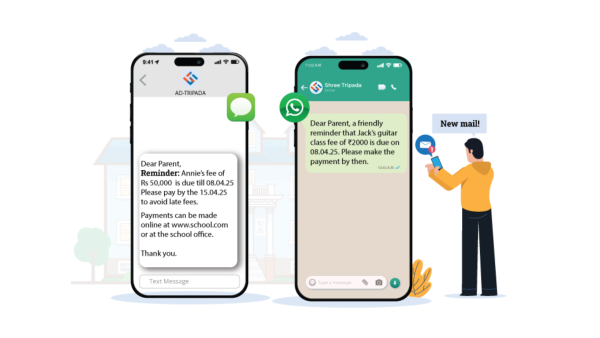
Fees are where most institutes lose money without noticing. The cause is usually a gap in follow-up, so a late payment slips through. Good fee management tracks every instalment and due date. It sends SMS reminders before each due date, and you can notify overdue parents by hand.
Parents can pay online with UPI, cards or net banking through your own payment merchant. Receipts appear in the parent app. Parents already pay by UPI daily. The finance ministry says UPI handled over 24,162 crore transactions in FY2025-26. For more ideas, read our fee collection tips.
2. Enquiry and lead tracking
Every admission starts as an enquiry. A good lead tracker stores each enquiry with its source, course interest and contact history. It schedules a follow-up date and shows the stage, from new to converted. You can also assign each lead to a counsellor and see who follows up well. Read how to track enquiry conversions for more.
3. Attendance tracking
Students punch in with a fingerprint or an RFID card on your scanner. Biometric attendance syncs to Classpro, and devices keep data offline until the internet returns. Parents get an alert right away. You can also set attendance rules and see late arrivals and absences. This reduces proxy attendance and the disputes that follow.
4. Parent and student app
Parents want answers without calling you. A parent app shows attendance, fees, test results, notes, assignments and schedules in one place. Students and parents get separate logins, and a parent can switch between children. The app runs on Android and iOS. As a result, parents trust you more and ask you less.
5. Test and performance tracking
Your teachers enter marks, and the system does the rest. Performance tracking alerts parents about upcoming exams and sends reminders closer to the date. It creates a scorecard for each student with subject-wise marks and grades. Parents can download it any time. So parents see progress without waiting for a meeting.
6. Reports and owner dashboards
You can’t manage what you can’t see. Reports show cleared and pending fees, in total and per student. They also show admissions by course and how many enquiries become enrolments. You can compare batch scores and attendance too. This lifts the mental load, because you stop keeping numbers in your head.
7. Homework and assignments
Teachers create assignments with instructions and due dates. Students get a notification right away. Teachers mark each task as submitted or pending and send one-click reminders. They can also give feedback inside the system. As a result, homework follow-up stops eating class time.
How a coaching management system helps you open a second branch
Many owners delay a second branch because the first one already feels hectic. A coaching management system gives you the data to decide with confidence. Before you expand, check that you can answer four questions:
- Fee status: Can you see paid and pending fees for every batch today?
- Batch quality: Can you compare attendance and scores across batches?
- Admissions: Can a counsellor follow every lead without you?
- Parent contact: Can parents get updates without calling you?
If you answer yes to all four, you’re ready to grow. Good coaching management software answers these questions from its reports. Our branch checklist covers the rest, from staff to timetables.
How much a coaching management system costs in India
Most vendors price coaching management software by student count, modules and support level, and they bill yearly. Classpro bills annually based on the plan you choose. Its plans page lists a free 7 day plan with the full feature suite. Paid pricing comes after a call with the team, so ask for a quote in writing.
| Cost factor | What to ask |
|---|---|
| Student count | Does the price change as you add students? |
| Modules | Which features come in the base plan? |
| Payment gateway | Which fees apply to online payments? |
| Support | Does the plan include onboarding? |
Compare the total yearly cost of each coaching management system across at least three vendors. Also ask what happens to your data if you leave. A good vendor answers both questions clearly.
How to choose a coaching management system
Pick a tool by the problems it solves for you. Ask these five questions during any coaching management system demo:
- Daily stress: Will this cut my daily workload?
- Fee collection: Will this improve how I collect fees?
- Parent contact: Will parents get updates without calling me?
- Growth: Will it support a second branch later?
- Team use: Will my staff use it easily?
Support matters as much as features. You’ll use this system every day, so check how fast the vendor replies. Read our list of common mistakes before you sign. Also test any trial with your real data first.
Try a coaching management system free for 7 days
If your institute feels heavier to run than it should, that’s your signal. Classpro gives you a full 7 day trial with fees, attendance, enquiries and the parent app. Start your free trial today and test it on one batch. You can also check pricing before you decide.
FAQs
What is a coaching management system?
A coaching management system is software that manages fees, attendance, enquiries and parent updates. It replaces registers and spreadsheets with one shared record. You, your teachers and parents all see the same up-to-date data.
When should a coaching institute start using one?
In our experience, most institutes need one at around 50 students or three batches. Start earlier if fee follow-ups or attendance disputes already take hours each week. Starting early also keeps your records clean from day one.
Is there a free coaching management system?
Classpro offers a free 7 day plan with its full suite. That includes fees, attendance and the parent app. In our experience, free tools cover only basic records. Check that any free coaching classes software handles reminders and reports before you rely on it.
Which coaching management software is best for coaching classes in India?
The best choice depends on your size, your budget and the problems you face today. Use the five-question checklist above and test two or three tools with your real data. Classpro is one option, built for Indian coaching institutes.
How does coaching classes management software improve fee collection?
Good coaching classes management software tracks every instalment and due date in one place. It sends SMS reminders before each date. Parents can pay online by UPI, card or net banking. You see paid and pending fees at any moment.



1 Comment
greate